Equipment fails. Procedures get ignored. People get hurt. Every year, hundreds of workers suffer serious injuries during maintenance due to unexpected startup of machinery. The root cause? Incomplete or missing lockout tagout (LOTO) processes — and at the heart of every effective LOTO program is a properly filled-out form.
A lockout tagout forms PDF isn’t just paperwork. It’s a legal safeguard, a communication tool, and a step-by-step record of how energy was isolated. When done right, it protects workers. When skipped or poorly executed, it leads to citations, downtime, and, worst of all, preventable harm.
This guide cuts through the regulatory noise and gives you real-world tools: where to find reliable lockout tagout forms PDFs, how to use them correctly, and what mistakes to avoid.
What Is a Lockout Tagout Form?
A lockout tagout form is a documented procedure used during servicing or maintenance of machinery to ensure all hazardous energy sources are isolated and secured. It includes details like: - Equipment being serviced - Type of energy sources (electrical, hydraulic, pneumatic, etc.) - Lockout device used - Name and signature of authorized employee - Date and time of lock application and removal
These forms create an auditable trail. In the event of an OSHA inspection or incident investigation, they provide proof that a proper LOTO process was followed.
While OSHA does not require a specific form format, it does mandate documentation of the energy control procedure (29 CFR 1910.147). A standardized PDF template ensures consistency and compliance across teams and shifts.
Why Use a PDF Template for Lockout Tagout?
PDFs have become the standard for LOTO forms — and for good reason.
Portability & Print-Ready Format PDFs preserve formatting across devices. Whether opened on a tablet at the factory floor or printed in the maintenance office, the layout stays intact. No misaligned fields or missing checkboxes.
Editable, But Tamper-Resistant Editable PDFs allow technicians to fill out fields digitally without altering the structure. Once saved, they're harder to modify than Word documents — crucial for audit integrity.
Easy Distribution and Archiving Store completed forms in shared drives or cloud systems. Searchable text makes retrieving records simple during audits or incident reviews.
Real-World Tip: Pair your PDF form with a digital checklist system. Some companies use tablets with pre-loaded LOTO forms that sync automatically to a central database when completed.
Key Sections of a Complete Lockout Tagout Forms PDF
Not all templates are created equal. A weak form skips critical fields. A strong one guides the user through every step.
1. Equipment Identification Include:
- Machine name and ID number
- Location (plant, floor, line)
- Department or section
Example: “Hydraulic Press #L4, Assembly Line B, North Plant” — not just “Press Machine.”
Common Mistake: Using vague names like “the conveyor.” If two people interpret it differently, someone might unlock the wrong system.
2. Energy Sources Checklist Break down each energy type:
- Electrical (disconnect switch, breaker)
- Pneumatic (valves, air lines)
- Hydraulic (reservoirs, pressure lines)
- Mechanical (springs, gravity-fed parts)
- Thermal (hot surfaces, steam)
Each source should have a dedicated checkbox and verification field.
3. Authorized Personnel Log List:
- Name and role of person applying lock(s)
- Contact method (radio ID, phone)
- Supervisor approval (if required)
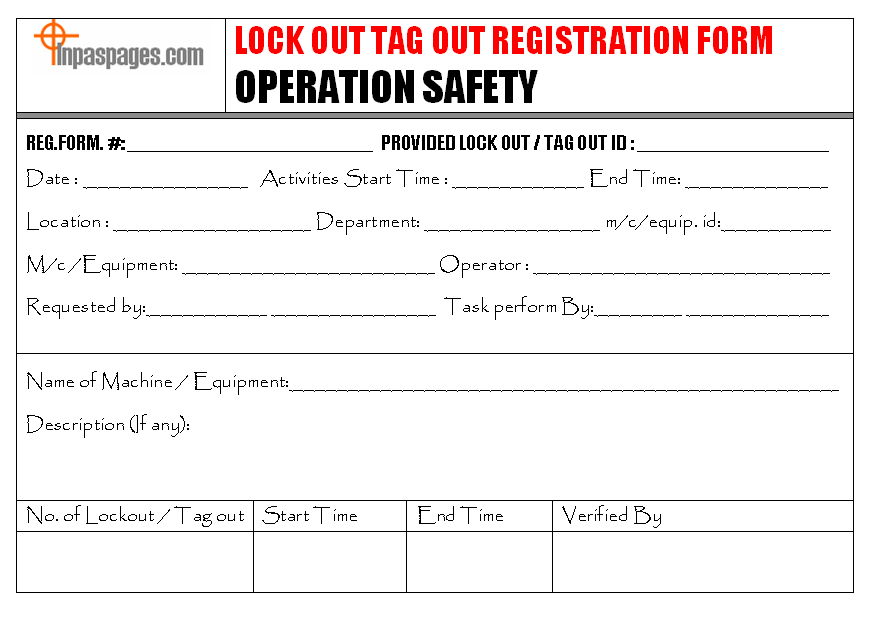
Limitation Note: Some PDF forms don’t include space for multiple locks. If more than one worker is involved, use a group lockout box or attach a supplemental sheet.
4. Lock and Tag Details For each lock:
- Lock ID number
- Tag number
- Time applied
- Reason for lockout
This helps during shift changes or extended outages.
5. Verification of Zero Energy
This is where safety is confirmed. The form should require the technician to: - Test isolation (e.g., press start button) - Confirm no residual energy - Sign off on verification
Skip this, and you’ve only assumed safety.
6. Release and Removal Section Only after work is done:
- Final inspection confirmation
- Sign-off by authorized employee
- Time of lock removal
Never allow removal by someone other than the original locker — unless under strict re-authorization procedures.
Where to Find Reliable Lockout Tagout Forms PDF
Many companies waste time building forms from scratch. Don’t. Use vetted templates and customize them.
Here are five trusted sources offering free, downloadable lockout tagout forms PDF:
| Source | Features | Notes |
|---|---|---|
| OSHA.gov | Basic compliance-aligned template | No frills, but OSHA-approved structure |
| NIOSH (CDC) | Bilingual (EN/ES), multi-energy focus | Great for diverse teams |
| SafetyNow | Fully editable, visual layout | Clean design, ideal for printing |
| Creative Safety Supply | Includes pictograms and QR codes | Modern, scannable forms |
| EHS Daily Advisor | Industry-specific versions | Available for manufacturing, labs, utilities |
Pro Tip: Download multiple templates and blend the best sections. For instance, use OSHA’s structure but adopt SafetyNow’s clear formatting.
Common Mistakes with Lockout Tagout Forms PDF
Even with a great template, mistakes happen.
❌ Using a Generic Form for All Machines A single form rarely fits every machine. A CNC lathe has different energy points than a boiler. Customize your PDF for high-risk equipment.
❌ Skipping the Verification Step Signing “verified” without testing is worse than not having a form. It creates false confidence.
❌ Allowing Blank Fields Incomplete forms = non-compliance. If a field doesn’t apply, write “N/A” — never leave it blank.
❌ Storing Forms in a Drawer Paper forms get lost. PDFs saved only on one laptop disappear. Store completed forms in a shared, backed-up folder with clear naming: LOTO_Form_MachineL4_2025-04-05.pdf
❌ Failing to Train on the Form A form is only as good as the person using it. Train new hires not just on LOTO principles, but on how to fill the form correctly.
Workflow Insight: Run quarterly audits where supervisors review 10 random LOTO forms for completeness. Flag recurring errors and retrain.
How to Customize Your Lockout Tagout Forms PDF
A one-size-fits-all approach fails in real facilities. Tailor your PDF to your environment.
Step 1: Map High-Risk Equipment List machines
with:
- Multiple energy sources
- Frequent maintenance
- History of near-misses
Step 2: Add Machine-Specific Fields For a conveyor system, include:
- Belt tension release point
- Drive motor ID
- Emergency stop circuit location
Embed these in your PDF as custom fields.
Step 3: Use Conditional Formatting (in editable PDFs) Some PDF editors allow dropdowns. Example: - “Energy Type” → [Electrical, Hydraulic, Pneumatic] Selecting “Hydraulic” could auto-show relevant verification steps.
Step 4: Brand and Standardize Add your company logo, safety slogan, and document control number. This reinforces ownership and professionalism.

Example: A food processing plant added a “Sanitation Lockout” section to their PDF for CIP (clean-in-place) procedures — reducing cross-contamination risks.
Digital vs. Paper Lockout Tagout Forms: What Works Better?
The debate isn’t just about convenience — it’s about compliance speed and error reduction.
| Factor | Paper Forms | Digital (PDF) Forms |
|---|---|---|
| Real-Time Access | No | Yes (if cloud-based) |
| Error Detection | Manual | Can include validation rules |
| Audit Trail | Physical log | Automatic timestamping |
| Training Integration | Limited | Link to video guides |
| Backup & Recovery | Risk of loss | Cloud redundancy |
Verdict: Digital PDFs win for most modern workplaces. They reduce human error and integrate with EHS platforms. But — ensure offline access. A locked-out machine shouldn’t wait because the Wi-Fi’s down.
Use Case: A chemical plant shifted to tablets with offline-capable LOTO PDFs. Technicians fill forms in hazardous zones, then sync when back in safe areas. Audit prep time dropped by 60%.
Making Lockout Tagout Forms Part of Your Safety Culture
A PDF is just a tool. Culture makes it work.
Post It Visibly Print sample filled forms and hang them near high-risk machines. Show workers what “done right” looks like.
Audit Religiously Review 5–10% of completed lockout forms monthly. Look for:
- Consistent naming
- Verification proof
- Correct sign-offs
Reward Compliance Recognize teams with zero LOTO violations. Not punishment — positive reinforcement drives better behavior.
Real Limitation: Some older technicians resist digital forms. Pair change with hands-on training and peer mentors.
Final Checklist: Is Your Lockout Tagout Forms PDF Effective?
Use this quick test before rolling out or updating your template:
✅ Includes all required OSHA elements ✅ Machine-specific where needed ✅ Editable but secure (can’t alter structure) ✅ Has clear verification and release sections ✅ Stored centrally with backup ✅ Used consistently across shifts ✅ Part of employee training program
If you can’t check all seven, revise your form now.
A lockout tagout forms PDF isn’t just a document. It’s the last line of defense between a technician and a life-altering injury. Use a proven template, customize it for your site, and enforce its use like you would a hard hat or safety glasses.
Download a reliable lockout tagout forms PDF today. Fill it. File it. And make sure every worker goes home safe.
FAQ
Where can I download a free lockout tagout forms PDF? OSHA, NIOSH, and safety supply companies like Creative Safety Supply offer free, downloadable templates.
Can I edit a lockout tagout PDF form? Yes, many templates are editable. Use software like Adobe Acrobat or free tools like PDFescape to customize fields.
Do I need a separate form for each machine? Not necessarily, but high-risk or complex machines should have specific procedures. Use attachments if needed.
Who can fill out a lockout tagout form? Only authorized employees trained in energy control procedures should complete and sign the form.
How long should I keep completed LOTO forms? OSHA recommends retaining records for at least one year, though some companies keep them for 3–5 years for liability protection.
Can digital signatures be used on LOTO PDFs? Yes, if your system ensures authenticity, time-stamping, and non-repudiation — especially in electronic EHS platforms.
What happens if a lockout form is incomplete? Treat it as non-compliant. The lockout may be invalid, and the equipment should not be considered safe for maintenance.
FAQ
What should you look for in Lockout Tagout Forms PDF – Free Templates & Best Practices? Focus on relevance, practical value, and how well the solution matches real user intent.
Is Lockout Tagout Forms PDF – Free Templates & Best Practices suitable for beginners? That depends on the workflow, but a clear step-by-step approach usually makes it easier to start.
How do you compare options around Lockout Tagout Forms PDF – Free Templates & Best Practices? Compare features, trust signals, limitations, pricing, and ease of implementation.
What mistakes should you avoid? Avoid generic choices, weak validation, and decisions based only on marketing claims.
What is the next best step? Shortlist the most relevant options, validate them quickly, and refine from real-world results.